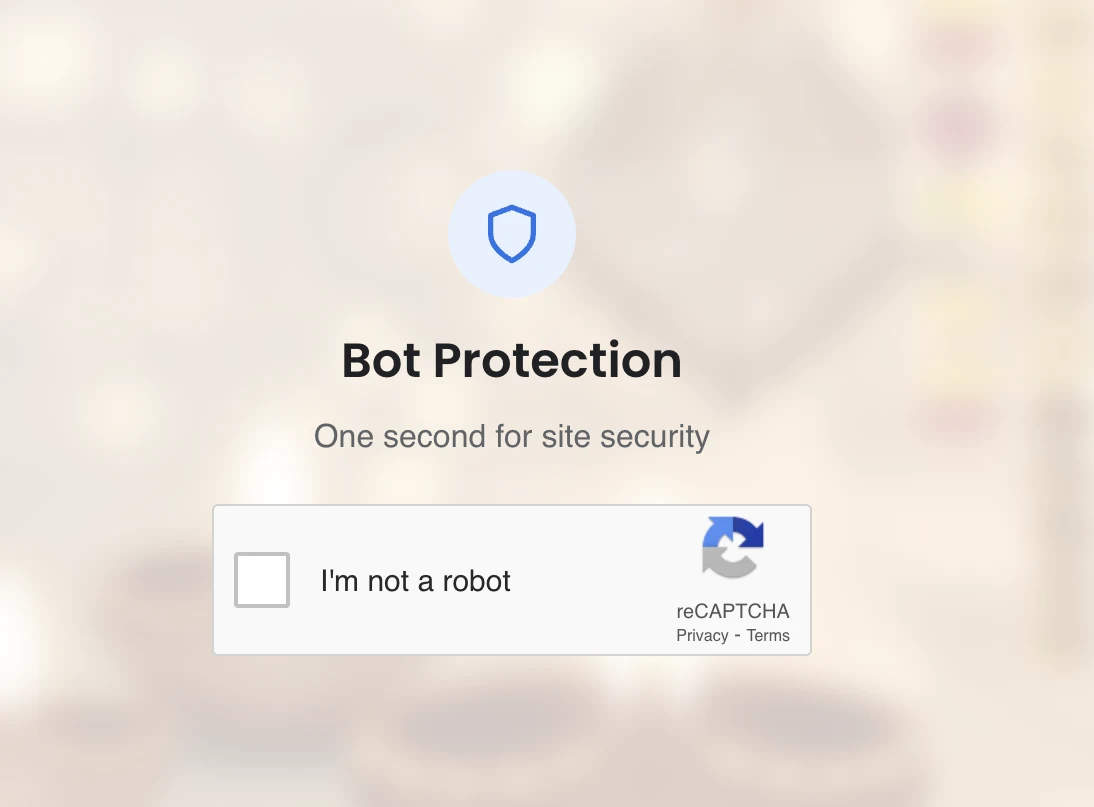
A likely WordPress wp2shell attack replaced a client’s public website with a fake bot-protection screen. Crisant contained the incident, removed malicious changes, restored trusted code, patched WordPress, rotated access, hardened the installation and monitored recovery while keeping the client anonymous.
Planning a project? See Crisant’s website security and malware-recovery service →
What visitors saw during this WordPress incident
On 22 July 2026, Crisant responded to a compromised WordPress website belonging to a client whose name we are intentionally withholding. Instead of the normal site, visitors were presented with a polished ‘Bot Protection’ page asking them to confirm that they were not a robot. The screen borrowed familiar reCAPTCHA-style visual language, which could make the interruption look like a legitimate security check.
It was not part of the client’s intended website experience. Unexpected verification pages, redirects, pop-ups, injected advertisements or unfamiliar downloads should be treated as possible compromise indicators—especially when the website owner did not configure them. Visitors should avoid clicking or entering information and should notify the business through a separate trusted channel.
The screenshot above is useful evidence of what a visitor encountered, but it does not prove how an attacker entered. Several different compromises can produce the same visible result. Attribution requires the WordPress version, file and database changes, accounts, scheduled tasks, hosting logs and other evidence to be reviewed together.
Why the wp2shell vulnerability chain is the strongest explanation
The timing and technical conditions make the recently disclosed WordPress core chain the strongest working explanation for this incident, although Crisant is not presenting that conclusion as absolute proof. The official WordPress release says WordPress 7.0.2 fixed a REST API batch-route confusion and SQL injection issue that could lead to remote code execution. WordPress 6.9.5 contains the corresponding backport.
The critical advisory, CVE-2026-63030, covers WordPress 6.9.0 through 6.9.4 and 7.0.0 through 7.0.1. It combines with the SQL injection tracked as CVE-2026-60137. Akamai’s analysis explains that an anonymous request to the REST batch endpoint could bypass expected validation, reach the database layer, manipulate stored state, obtain a privileged context and ultimately allow malicious PHP to run. No stolen WordPress password was required for the initial request.
Akamai uses ‘wp2shell’ in the name of its detection rule for this attack chain. That label is useful shorthand, but the important operational detail is the unauthenticated path from a public API request to database access and code execution. WordPress urged affected installations to update immediately and enabled forced automatic updates because of the severity.
WordPress 6.8.0 through 6.8.5 was affected by the separate SQL injection and should be updated to 6.8.6, but the official advisory says the REST-to-code-execution chain applies to WordPress 6.9 and higher. Versions before 6.8 are not listed as affected by these two July advisories. Themes, plugins and hosting can still introduce unrelated risks, so a core version check is only one part of incident review.
How Crisant contained and cleaned the compromised site
Crisant treated the website as a full compromise rather than deleting the visible page and declaring success. A redirect or fake verification screen is a symptom; the attacker may also have created persistence in PHP files, uploads, plugins, themes, database records, administrator accounts or scheduled jobs. The response therefore moved from containment to evidence, cleanup, recovery and hardening.
The sequence below describes the remediation applied to this incident at a client-safe level. It deliberately omits names, domains, credentials, malicious payloads and other details that could expose the affected business or help someone reproduce the attack.
| Response stage | What Crisant did | Why it mattered |
|---|---|---|
| Containment | Restricted the compromised site and stopped the malicious visitor experience | Protected visitors while the investigation continued |
| Evidence | Preserved the relevant site, database and available log state before destructive cleanup | Kept clues needed to distinguish the symptom from the entry point |
| Access review | Checked privileged users, hosting access and unexpected changes | Looked for attacker-created access that could survive a cosmetic fix |
| Code and data cleanup | Removed malicious changes and replaced affected application files with trusted copies | Eliminated both the visible injection and hidden persistence |
| Patching and rotation | Applied safe core updates and reset privileged credentials and WordPress security keys | Closed known exposure and invalidated existing sessions |
| Validation and monitoring | Retested public journeys, scanned the recovered site and watched for recurrence | Confirmed recovery beyond a clean-looking homepage |
Cleaning the infection meant checking more than the homepage
The cleanup compared the deployed WordPress application against trusted sources and removed code that did not belong. WordPress core files were restored from an official package for the selected patched release. Installed themes and plugins were reviewed for necessity and provenance; unknown or untrusted components were removed, while legitimate components were updated from their official distribution channels.
The database was also inspected for unexpected administrators, altered options, injected scripts, modified URLs and other attacker-controlled state. Uploads, must-use plugins, theme files, configuration, rewrite rules and scheduled tasks received attention because persistence is often placed away from the first visible symptom. File permissions and executable locations were reviewed before the public site returned.
Credentials capable of changing the website were treated as exposed. Crisant reset WordPress administrative access and the relevant hosting, deployment and database credentials, then refreshed WordPress security salts so existing authenticated sessions would no longer remain valid. Access was reduced to the people and systems that actually required it, with stronger authentication applied where supported.
Finally, the recovered website was tested like a real customer would use it. Pages, forms, navigation, analytics and important conversion paths were checked alongside malware and file-integrity scans. A clean homepage alone is not sufficient when malicious code can activate only for search visitors, mobile users, particular referrers or scheduled intervals.
The entry point was patched and the WordPress baseline hardened
The affected WordPress branch was moved to a fixed version: 7.0.2 for WordPress 7.0 or 6.9.5 for WordPress 6.9. Sites remaining on WordPress 6.8 should use 6.8.6 for the associated SQL injection fix. Core, theme and plugin automatic-update settings were reviewed so emergency security releases would not depend on someone noticing a dashboard badge days later.
Crisant then reduced the attack surface and added defensive layers appropriate to the hosting environment. That included removing unused software and accounts, tightening administrative access and file controls, checking backup integrity, and placing traffic filtering and monitoring around the application. A web application firewall can block known exploit patterns and reduce automated attacks, but it is a supporting control—not a substitute for applying the vendor’s patch.
Clean, off-site backups are part of the security system. A backup made after persistence was introduced can quietly restore the attacker with the website. The recovery baseline therefore needs a known-good restore point, protected storage and a tested process. Monitoring should cover uptime, file change, suspicious authentication, new privileged users and unusual outbound or scheduled behaviour.
The lasting lesson is accountability. Someone must own vulnerability alerts, emergency patch decisions, backup tests and incident response. A WordPress website can be maintained responsibly, but public software, extensions, credentials and hosting cannot be left without an operating routine.
What to do if your website shows the same warning signs
Do not click through the unexpected challenge and do not assume that removing one file has solved the incident. Record what visitors are seeing, when it began and which devices or traffic sources trigger it. Preserve hosting and application logs where available. Avoid repeatedly editing the live site before evidence is captured, because timestamps and changed files can help identify the compromise window.
From a separate trusted device, secure the hosting account, domain and administrative access. If customer, employee or payment data may have been exposed, involve the appropriate legal, privacy and payment specialists; malware cleanup does not replace breach-assessment obligations. Tell users what they need to know through a clean communication channel rather than through the compromised website.
If you are facing a fake CAPTCHA, malicious redirect, unknown administrator, injected search content or any other sign that your website has been taken over, Crisant can help even if another agency built the site. Contact us with the affected URL and a screenshot. We will start with containment and triage, explain the recovery scope clearly, and work toward a clean, patched and monitored website.
Is your website showing a fake CAPTCHA, redirecting visitors, adding unknown administrators or serving content you did not publish? Contact Crisant now. We can triage the incident, clean the compromise and help you establish a safer recovery baseline.
Get urgent website help →