RAILWAY IoT / A CRISANT SOLUTION

Non-interlocked
LC gate monitoring.
In real time.

A connected view from the crossing to the control room. Field sensors, station displays, RailCross Command and mobile monitoring bring gate position and equipment health into focus.

Field sensors. Station displays. Web and mobile visibility.

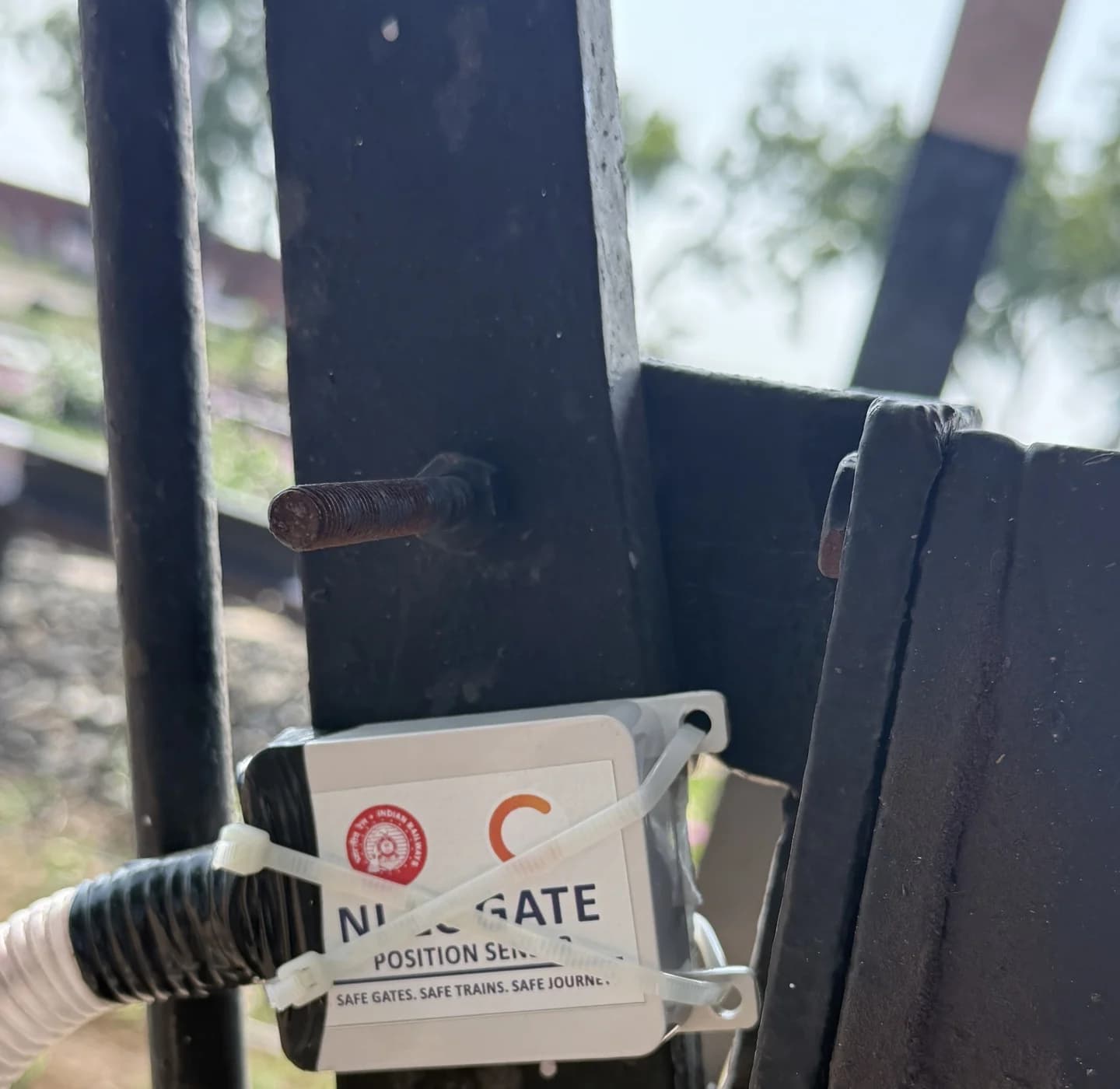
Crisant gate-position sensor mounted at the Aliyabad level crossing
FIELD / CONNECTEDVisibility starts here.Aliyabad installation · Project photograph
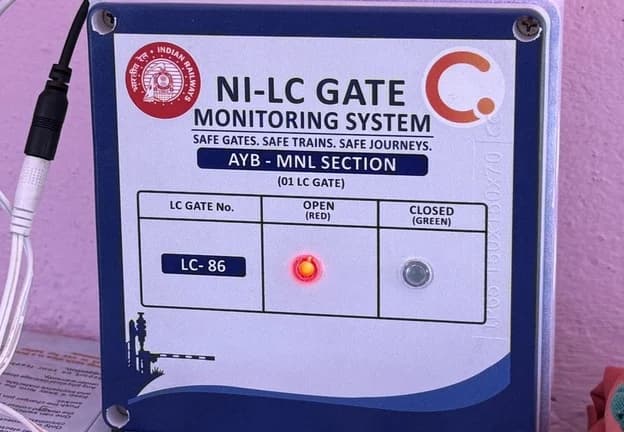
Installed Crisant LC gate station display showing the gate status indicatorsAT THE STATION / STATUS DISPLAY
Field. Station. Command.One connected monitoring workflow.
Field → stationSensors and local display units
Web + mobileRole-scoped operational visibility
State + healthGate position and equipment context

Non Interlock LC Gate Realtime Monitoring System

Crisant’s Non-Interlocked LC Gate Realtime Monitoring System connects gate-position sensors and field control units with station displays, a central web dashboard and mobile access. Railway teams can review reported open or closed states, sensor faults, device health, event history and operational reports across assigned gates and divisions.

01 / The problem

Distance should not obscure the status of a gate.

See the state. Check its freshness. Understand the context.

A non-interlocked level crossing brings people, equipment and operating procedures together at a location that may be far from the reviewing officer. Phone calls and isolated records make it difficult to see several gates at once, reconstruct a sequence of events or identify which device needs maintenance.

A last-known position also needs context. A displayed CLOSED state tells an incomplete story if the sensor has stopped reporting. Operational teams need to distinguish a valid recent observation from missing telemetry, an unknown sensor state or an offline control unit.

The Crisant system joins field sensing, connectivity and a shared application view. It keeps gate position, data freshness and device health visible together, with division and gate assignments that put the relevant information in front of Station Masters, SSEs and reviewing administrators.

02 / The complete solution

One connected system. From trackside to oversight.

The sensing hardware and the software are designed to work together, with a clear view at the gate, the station and the reviewing desk.

01

Gate-position sensing

A field-mounted sensor observes gate position and passes it to the sensor control unit. The project supports mercury and mercury-plus-gyro configurations, with explicit sensor-health reporting on compatible firmware. Site survey and commissioning establish the correct state mapping.

02

Connected field control units

Managed controllers send authenticated heartbeats with gate state and available health information. The platform supports HTTPS and MQTT integration paths; the selected controller, cellular coverage, power supply and firmware determine the installation’s communication arrangement.

03

Station display units

Assigned gates can be shown on dedicated station display hardware. The platform tracks display assignments, heartbeat, power status and firmware, bringing the physical display into the same managed equipment estate as the field controller.

04

RailCross Command web console

A live network dashboard combines open, closed and fault counts with a gate map, daily state timeline and recent activity. The LC gate registry offers card and table views, status filters and individual gate details for focused operational review.

05

RailCross Watch mobile access

The companion mobile application provides division- and gate-scoped monitoring, card and map views, gate details and offline handling. Mobile sign-in uses WhatsApp OTP, with revocable sessions. Device support and rollout are confirmed as part of deployment.

06

Alerts and recipient control

Authorised recipients can receive configured gate-state notifications. Web and mobile alert audiences follow access assignments, while per-gate recipient settings control WhatsApp alerts and nightly PDF delivery independently. Delivery depends on the configured channel and network.

07

History and daily reports

Review status transitions, telemetry context and date-filtered operational history. Daily gate reports support PDF export, with scheduled nightly delivery for enabled recipients. This creates a common record for handovers, review and maintenance follow-up.

08

Managed access and maintenance

Admin, Division Admin, SSE and Station Master roles define who can manage or view gates. Managed equipment exposes heartbeat and firmware information, with controlled firmware releases and OTA update support on compatible units.

03 / How it works

From a field observation
to an informed view.

A sensor observes the gate. A controller communicates the reading. The platform distributes the reported state and its context to assigned displays and users.

01Gate-position sensor
02Field control unit
03Monitoring platform
04Station · Web · Mobile
Interactive illustration · Sample gate
LC / DEMOClosedRecent valid update

Explore a reported state

A recent, valid closed reading is shown in green. The observation time stays visible alongside the reported state.

This illustration explains monitoring states. It is not connected to field equipment.

Purpose: monitoring and operational visibility. This solution does not replace signalling interlocking, movement authority or prescribed railway operating procedures.

04 / Inside the application

The crossing network, in one workspace.

Explore the working RailCross Command interface, from network timelines and maps to individual gate records.

In the field / Actual project photography

Built to connect
the physical crossing.

These photographs from the Aliyabad installation show the gate-position sensor, control unit and station display. Hardware configuration is selected and commissioned for each site.

Gate-position sensor at the Aliyabad LC gate installation
01 / Gate-position sensorField-mounted sensing at the crossing.
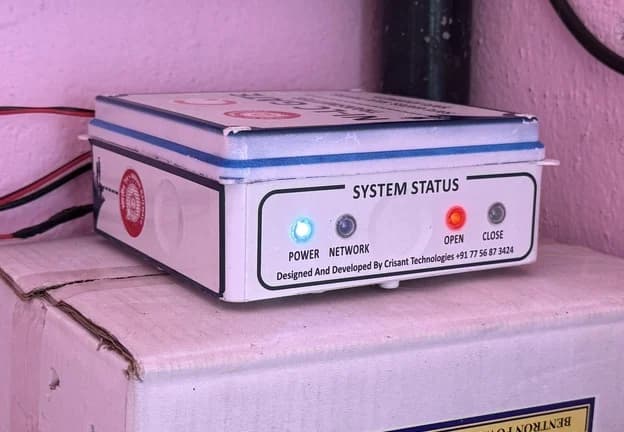
Sensor control unit at the Aliyabad LC gate installation
02 / Sensor control unitField hardware with system-status indicators.
Station display at the Aliyabad LC gate installation
03 / Station displayA dedicated view of assigned gate status.

05 / The value it adds

Better visibility.
More useful follow-up.

RailCross presents position alongside freshness, faults and managed-device information. That helps a reviewing team separate a gate observation from a communication or sensor problem, while retaining the history needed to investigate what happened.

01

A shared operational view

Bring reported gate position, data freshness and equipment context together across a section or division.

02

Focused maintenance follow-up

Use sensor faults, controller and display heartbeats, firmware information and recent history to guide investigation.

03

Traceable handovers

Review a daily state timeline and downloadable gate reports instead of reconstructing every sequence from separate notes.

04

Information for the right people

Match visibility and notifications to assigned gates, divisions and recipients, with distinct operational and administrative roles.

The right view for each responsibility.

  • Station Masters monitoring assigned gates
  • SSEs reviewing their equipment and section
  • Division administrators coordinating oversight
  • Maintenance teams investigating device health

06 / From demonstration to deployment

A field deployment starts with the field.

We survey gate mechanics, sensor mounting, station display requirements, power and network availability. The rollout then defines controller and display assignments, division access, recipients and reporting. A pilot checks state mapping, loss-of-data behaviour and visibility at every endpoint before a wider installation. Hardware, connectivity, commissioning, training and support are scoped for the railway’s requirements.

  1. 01

    Survey

    Gate mechanics, sensor mounting, power and network coverage.

  2. 02

    Configure

    Controllers, station displays, divisions, gate access and recipients.

  3. 03

    Commission

    State mapping, sensor faults, data freshness and endpoint visibility.

  4. 04

    Support

    Operator training, reporting, equipment monitoring and maintenance.

Before we begin

Good questions.
Clear answers.

What is a non-interlocked LC gate monitoring system?

It is a monitoring layer that collects reported gate position from field equipment and makes it available to assigned railway staff through displays and applications. Crisant’s solution combines gate sensors, control units, station display units, RailCross Command and mobile monitoring.

Does this system operate the gate or replace signalling interlocking?

This offering is for monitoring and operational visibility. It does not claim to operate the gate, provide signalling interlocking, grant movement authority or replace prescribed railway procedures. Project-specific approvals, acceptance criteria and operating requirements must be agreed with the railway.

How are OPEN, CLOSED and FAULT shown?

In the current console, a valid recent OPEN reading is red and a valid recent CLOSED reading is green. No valid update within ten minutes, no data or an unknown reading is shown as a fault in orange. Labels accompany the colours. Compatible controllers can also report explicit sensor faults.

How quickly does the dashboard update?

The web application uses real-time feeds and periodic refresh. The dashboard refreshes every ten seconds and the gate registry every fifteen seconds in the current implementation. End-to-end visibility also depends on controller reporting, network availability and the selected communication path; it is not a guaranteed latency.

Can a Station Master see only assigned gates?

Yes. SSE and Station Master accounts have read-only access to their explicitly assigned gates within their division. Division Admins manage their division, while global Admins can work across divisions. These permissions are enforced by the API.

Are alerts and daily PDF reports available?

Yes. Configured gate notifications, web and mobile alert handling, daily PDF export and nightly PDF delivery are implemented. WhatsApp alert and nightly-PDF preferences can be enabled independently for each gate recipient.

What happens if the field connection is lost?

Data freshness is part of the displayed status, so an old gate reading does not remain indefinitely classified as normal. Managed controller and display heartbeats provide equipment context, and the mobile application handles offline conditions. Site testing should verify the exact behaviour of the selected hardware and network.

What is included in a deployment proposal?

The proposal is based on gate count, sensing arrangement, field controllers, station displays, power and connectivity, web and mobile access, recipient setup, reporting, commissioning and support. We first review the site and operational requirements, then define the agreed bill of materials and rollout plan.
Bring your crossing network into view.

Share your gate count, station locations and monitoring requirements. We’ll demonstrate the platform and map out a practical field deployment.

Prefer to talk? WhatsApp us → · +91 77568 73424

We'll use these details only to respond to your enquiry. Protected by Cloudflare Turnstile.

Chat with us