PUNCHDESK / A CRISANT SOLUTION

Biometric attendance.
Connected,
end to end.

From the first punch at your terminal to the report on your desk. PunchDesk brings biometric hardware, employee attendance and everyday reporting into one connected system.

Compatible devices. Configured workflows. One team.

ATTENDANCE TERMINALVerification completeReady to connect
Terminal illustration
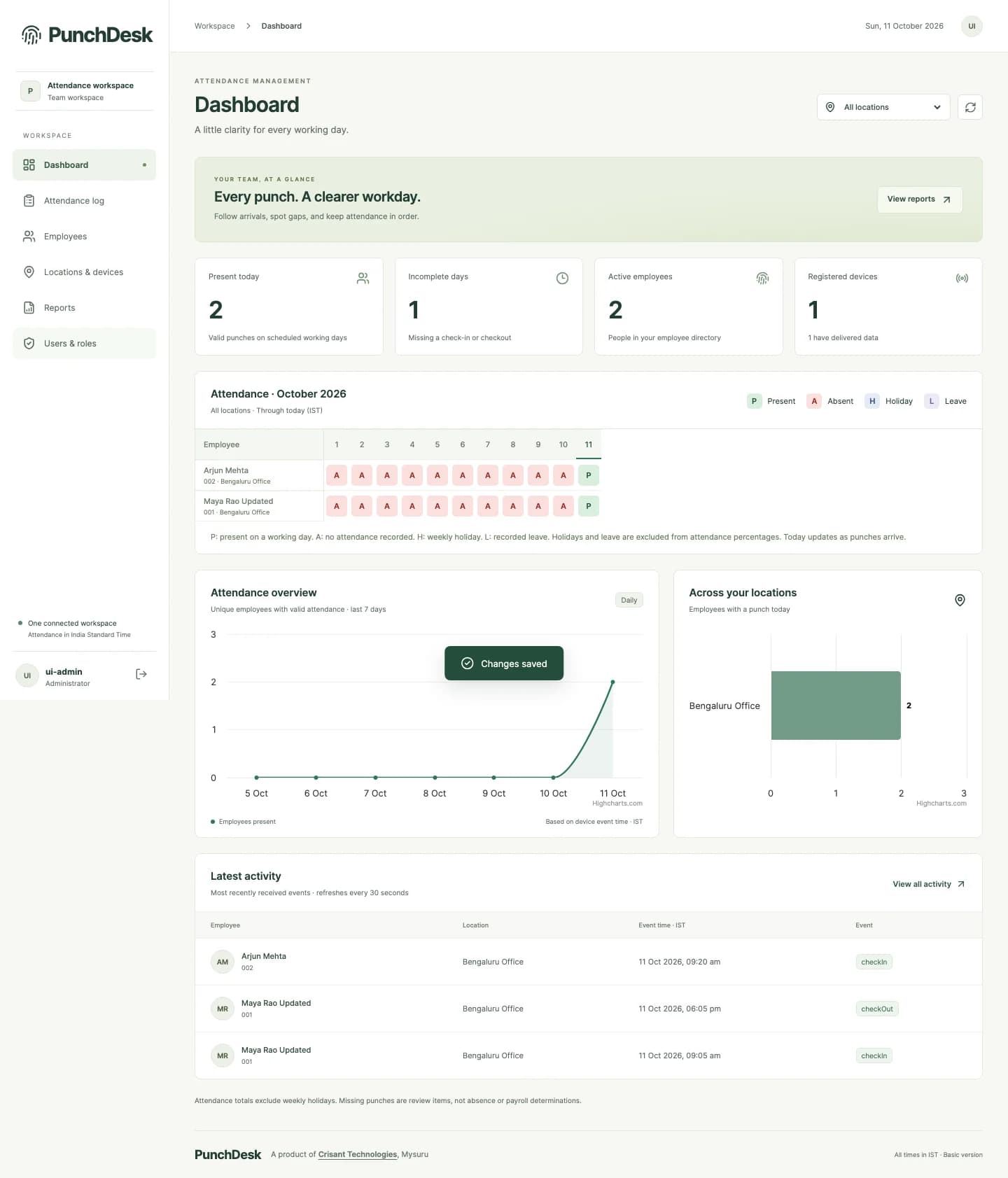
PunchDesk application dashboard with demonstration attendance records
Every punch, connected.Device → Location → Daily record
Actual application · Demonstration data
Hardware + softwareOne connected attendance solution
Multi-locationA shared view with controlled access
CSV · Excel · PDFReports ready for review

Every punch. A clearer workday.

PunchDesk is a biometric attendance system that connects compatible fingerprint and face-recognition terminals to a central web application. It brings together device events, employee dashboards, location-specific attendance rules, approved leave records and downloadable reports, with hardware integration and software support from Crisant Technologies.

01 / The problem

A punch on a device is only the beginning.

Turn device events into a record your team can actually use.

A biometric attendance machine can identify an employee, but the management work starts after that punch. Teams still need to collect records, reconcile missing checkouts, understand leave and weekly holidays, and answer questions about a particular day. When devices and spreadsheets sit apart, the same information gets checked and copied repeatedly.

Across locations, that problem grows. Different attendance rules, terminal event labels and manager responsibilities make a single spreadsheet difficult to trust. A late-arriving device record can change the picture, while repeated deliveries can inflate a poorly designed report.

PunchDesk connects those steps. It preserves the device event time, handles duplicate submissions and gives authorised people a consistent view of the source records behind attendance. Managers can move from a monthly overview to one employee and then to the punches that explain a day.

02 / The complete solution

Everything between the terminal and the team report.

Biometric attendance hardware and software, considered as one workflow. Start at the device and follow the record all the way to a useful report.

01

Biometric hardware integration

Connect compatible fingerprint and face-recognition terminals to a registered location. The verified integration includes the Hikvision DS-K1T321EFWX-B. We review the exact terminal, firmware, network and event format before agreeing the installation.

02

An everyday attendance dashboard

See present employees, incomplete days, registered devices, recent activity and a monthly attendance calendar. Location filters help managers focus on their own team, while central administrators can review the wider workspace.

03

An employee’s complete history

Open an employee dashboard to inspect login and logout trends, attendance breakdown, daily spans and a date-by-date table. Preset and custom date ranges support up to 366 days, with a drill-down to the contributing punches.

04

Location-specific calculation

Choose device-labelled check-in/check-out or first-and-last-punch calculation for a location. Configure data acceptance separately and set a weekly holiday, so the software reflects the supported attendance policy at each workplace.

05

Approved leave, kept in context

Managers can record approved full-day leave against an employee. Leave appears in dashboards, calendars and reports. Overlaps are checked, holidays are kept distinct, and a punch on a recorded leave day is highlighted for review.

06

Reports that travel with the work

Generate team reports and CSV exports, or download an employee’s history as Excel and PDF. Employee exports include the complete applied date range, with summary, daily records and leave information for a consistent review.

07

Roles and location access

Administrator, Manager and Viewer roles separate management from read-only access. Assign all locations or selected locations to an account; the server applies those boundaries to dashboards, employees, logs and exports.

08

Connect your other systems

Location-level outbound HTTPS webhooks can forward newly accepted device events to a client application. Queued delivery, retries and visible delivery status support integration with your existing workflow without blocking internal attendance processing.
03 / How it works

One punch.
A connected journey.

Explore each stage of the attendance workflow, from biometric verification to the report a manager reviews.

P

01 / Capture

09:05 · Check-in captured

An employee verifies at a compatible terminal. The event carries the employee code, device identity, original time and supported verification details.

Attendance with context: daily span means elapsed first-in to last-out time. Paid hours, break deductions, complex shifts and payroll require separately agreed rules.

04 / Inside the application

Clarity, at every level of detail.

From a team-wide calendar to an individual day. Explore screenshots of the working PunchDesk application.

Visit PunchDesk
ATTENDANCE TERMINALVerification completeReady to connect
The hardware connectionIllustration of a biometric terminal

At the source / Biometric hardware

Choose the terminal.
Connect the workflow.

Fingerprint and face attendance start with the right device and a dependable event connection. PunchDesk’s verified project integration uses the Hikvision DS-K1T321EFWX-B, with supported attendance events received by the application.

We review your device model, firmware, network and attendance settings before installation. An existing machine may be reusable after compatibility testing; new hardware is selected against the agreed requirement.

  • Registered terminal and location mapping
  • Supported fingerprint and face verification events
  • Duplicate handling and original event timestamps
  • Pilot validation before a wider rollout

05 / The value it adds

Less administration.
More understanding.

Crisant connects hardware integration with the application that makes the records useful. Device mapping, event ingestion, attendance calculation, report design and support are considered together, making it easier to investigate a missing record or adapt an agreed workflow.

01

Less spreadsheet assembly

Bring terminal records, calendars and exports into the same workflow so managers spend less time collecting files before a review.

02

A clearer conversation

Open the actual punches behind a daily record. Separate recorded attendance, leave, holidays and exceptions before drawing conclusions.

03

Branch-level accountability

Give each manager access to the locations they oversee, with a wider view available to authorised central administrators.

04

Useful beyond the dashboard

Share a consistent report with your team, or connect newly accepted events to another system through configured webhooks.

For teams that need a clearer daily record.

  • Offices and professional teams
  • Businesses with multiple branches
  • Institutions and administrative teams
  • Facility and running-room administration

06 / From demonstration to deployment

Configured around your workplace.

We start with your locations, headcount, compatible terminals and attendance rules. Hardware selection, connectivity, device mapping, user access, report needs and integration scope are agreed before rollout. A pilot verifies real punches and report calculations, followed by administrator training and support. PunchDesk is available online at punchdesk.in; project pricing depends on the hardware and deployment scope.

  1. 01

    Discover

    Locations, employees, terminal models and attendance policy.

  2. 02

    Connect

    Device configuration, location mapping and secure event delivery.

  3. 03

    Validate

    Real punches, exceptions, access permissions and report calculations.

  4. 04

    Roll out

    Administrator training, agreed integrations and ongoing support.

Before we begin

Good questions.
Clear answers.

Does PunchDesk include hardware and attendance software?

The solution covers compatible biometric terminals, their integration, the PunchDesk web application, configuration and support. The final hardware quantity, installation work, connectivity and commercial scope are agreed for your deployment.

Can we use our existing biometric attendance machine?

Possibly. The Hikvision DS-K1T321EFWX-B integration has been verified in the project. Other models require a review of their firmware, event format and connectivity. We confirm compatibility before committing to reuse an existing device.

Does it support fingerprint and face attendance?

PunchDesk accepts supported employee verification events from compatible biometric devices, including fingerprint and face punches. Available methods depend on the selected terminal and its configuration.

Can each branch have its own attendance rules?

Yes. Data acceptance, device-status or first-and-last-punch calculation, and the weekly holiday are configured by location. Users can also be restricted to their assigned locations.

Is PunchDesk a payroll or shift-management system?

The current product focuses on attendance records and reports. Daily span is elapsed first-in to last-out time; it does not deduct breaks or calculate paid hours. Payroll, overtime pay, complex shift rosters and overnight pairing require separately agreed rules and development.

How are leave and missing punches handled?

Managers record approved full-day leave; the current feature does not include leave balances or a request-and-approval workflow. Missing check-ins, missing checkouts and unexpected sequences remain visible for review. Missing punches alone are not a payroll or disciplinary conclusion.

Which attendance reports can we export?

Team reports support CSV. Employee dashboards provide a real Excel workbook with Summary, Daily attendance and Leave records sheets, plus a PDF with summary charts and daily records. The applied date range can cover up to 366 days and currently uses India Standard Time.

Can PunchDesk send attendance events to our application?

Yes. Each location can enable an outbound HTTPS webhook for new accepted direct device events. It supports optional Basic authentication, a delivery queue, retries and delivery status. Historical imports and duplicate submissions are not automatically forwarded; the receiving application should handle the delivery identifier idempotently.

Let’s connect your attendance workflow.

Tell us about your locations, employees and existing terminals. We’ll walk you through PunchDesk and scope the hardware, software and setup you need.

Prefer to talk? WhatsApp us → · +91 77568 73424

We'll use these details only to respond to your enquiry. Protected by Cloudflare Turnstile.

Chat with us